
training
Explanation of the training screen in the menu.
Normal time
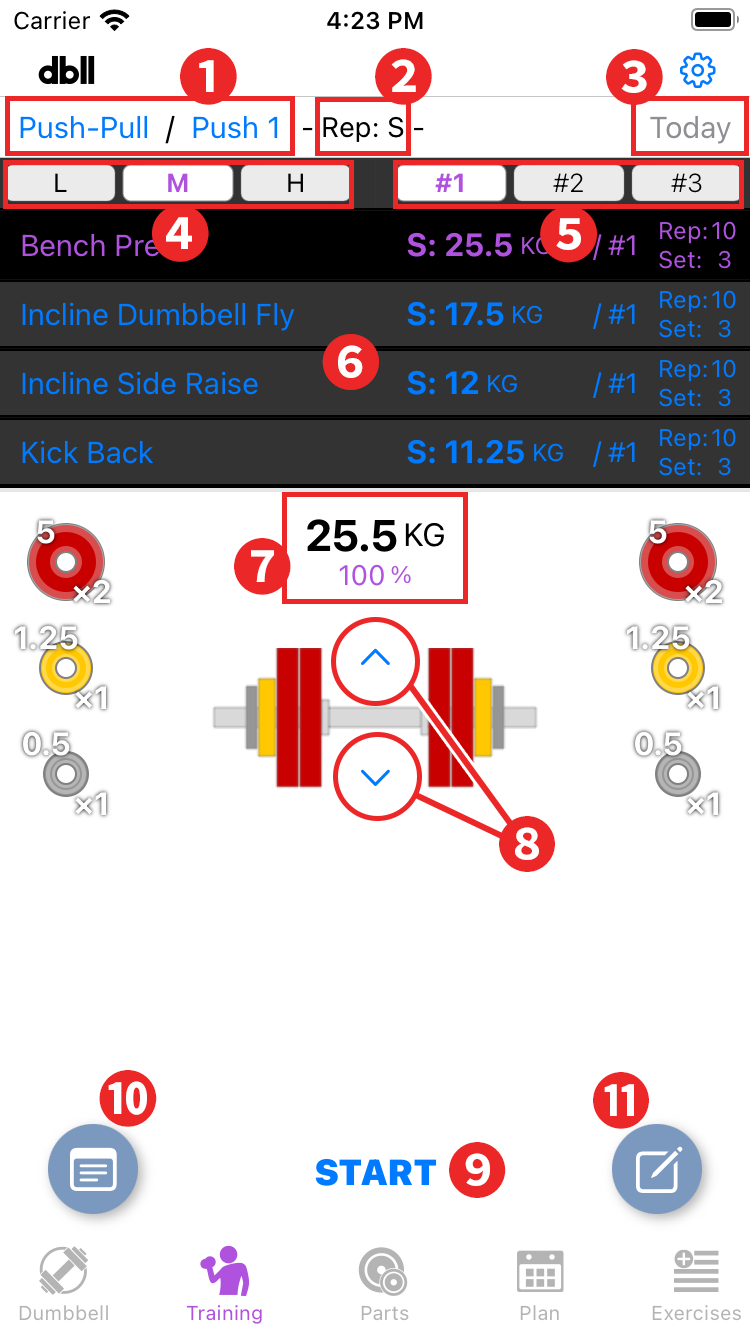
- Split, Workout switching: Switches split, workout. Cannot be operated during training.
- Rep mode display: When "Schedule" is on in "App settings" and a rep cycle is set, its rep mode is displayed. High rep is indicated by "H", medium rep by "M", low rep by "L", and "S" (Select) when there is no rep cycle.
- Today: Sets today's workout to the "Exercise list". If it is already set, it is gray, otherwise it is blue.
- Switch rep mode: Switches the rep mode. If "Schedule" in "App settings" is on and a rep cycle has been set, this button is disabled because that rep takes priority.
- Parts set switching: For space limitation, set names are shown as "#1", "#2", and "#3". You can use it by purchasing "3 parts sets" with in-app purchase.
- Exercise list: A list of exercises for the workout selected in “Split, Workout switching” will be displayed. Tap each exercise to toggle information on the dumbbells to be used. List items
- Dumbbell Info: Tap to toggle "Weight and Percentage" and "Shaft used and Left/Right Difference" information.
Press and hold the weight display to “Change pattern”. If you increase or decrease the weight using the "Change weight" button, you can also select "Update newer weight" to update the weight used for that exercise. In this case, the weight for other rep modes will also be automatically calculated and updated. - Change weight button: The weight of the dumbbell being displayed is increased or decreased. The percentage of the original weight is displayed in the "Dumbbell Info”.
- START: Start training. During training, some items in each menu will be unavailable.
- Record button: Displays the record screen for the selected exercise. You can operate it while training, but it will not be updated until all training is completed, so the latest record displayed will be the previous one.
- Memo button: Displays the Edit Memo screen for the selected exercise. There are a common memo and memos for each exercise, which can be managed separately.
List items
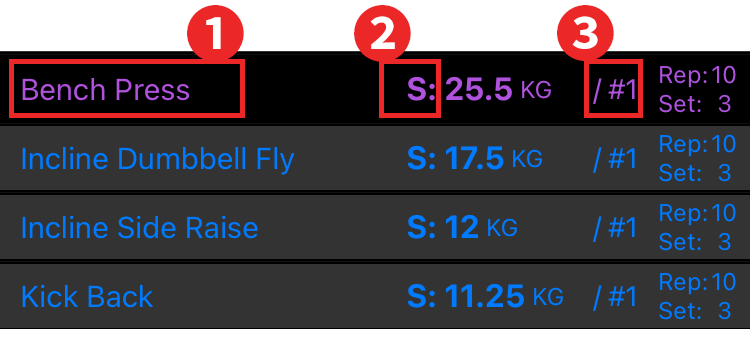
- Exercise name
- Rep mode
- Set mode
During Training
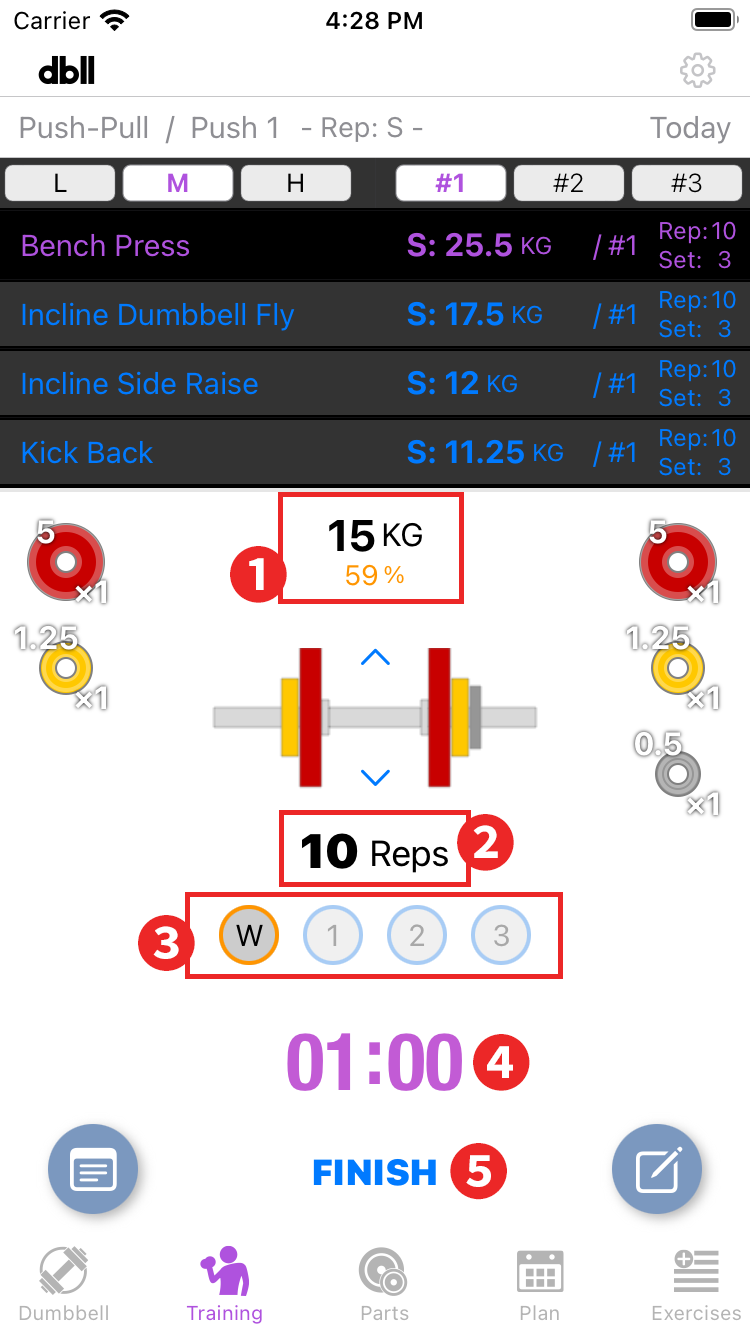
- Dumbbell Info: For sets with "Warm Up" set in "App Settings", the set percentage will be displayed in orange. If the set percentage weight cannot be created with dumbbells, the percentage of the closest weight that can be created will be displayed.
During warm-up, you can switch between the real weight and the warm-up weight by double tapping. - Reps display section
- Set count display section: A button with a set number will appear for the number of sets. When the set is completed, tap the button, and in the dialog that opens, record the number of reps you did and a star rating.
Finished set buttons are marked with a ✔. These are not saved until the end of the workout and can be edited at any time. Select the desired exercise in the "Exercise list" and tap the set number to edit.
If "Warm up" is set in "App settings," a "w" button will be added before the set goes live.
Press and hold the button to skip that exercise or set. Skipped sets will be marked with a X(cross mark). This cannot be edited. - Timer display section: Tap to start/stop timer. Double-tap to reset. Press and hold to display the timer time selection menu and change the timer time. ※When multiple “Timer times" are registered in the “App settings”.
- FINISH: Training is interrupted. The record of completed exercises will be saved. Saving an uncompleted exercise will open a confirmation dialog.